> ## Documentation Index
> Fetch the complete documentation index at: https://help.cryptolens.io/llms.txt
> Use this file to discover all available pages before exploring further.
# Introduction to Web API
> Introduction to Cryptolens Web API
## What is Web API?
We are working on a new version of this article.
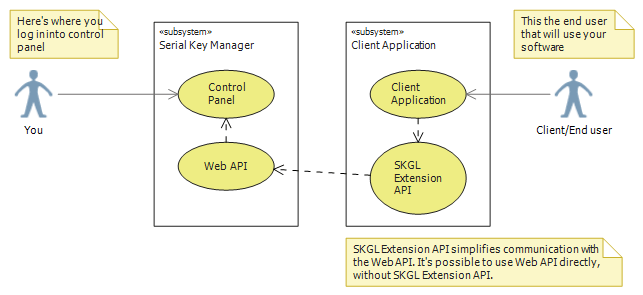
Web API can be thought of as a channel that can be used to talk to Cryptolens from external applications. It contains a wide range of methods that will respond different information depending on input parameters. For example, these methods allow you to activate keys, generate new ones, get list of activated machines, and so much more. It’s always possible to talk to the Web API directly, however, you will most likely use an existing API that simplifies that task. If you use an environment that is not supported at the moment, it is always possible to use the Web API right away, which makes Cryptolens a platform independent system.
 ## Next
* [Web API Reference](https://app.cryptolens.io/docs/api/v3)
* [Cryptolens Client APIs](https://help.cryptolens.io/web-api/skm-client-api)
## Next
* [Web API Reference](https://app.cryptolens.io/docs/api/v3)
* [Cryptolens Client APIs](https://help.cryptolens.io/web-api/skm-client-api)