
Getting started
To invite a team member, please visit Authorized admins page and enter the email address where you would like the invite to be sent.Note: before your team member can accept the invite, they need to have a Cryptolens account. Their account does not have to have an active subscription.
FAQ
Below is a summary of frequently asked questions. If you would have any other questions, please reach out to us at [email protected]!Can I See Which Admin Accessed My Account?
Can I See Which Admin Accessed My Account?
Yes. Open Security and look under Recent Audit Events. Authorized admin sign-ins are recorded, and new audit entries for supported changes identify the admin who performed them. Historical entries are not updated retrospectively.For the event fields and API access, see the Object Log reference and Get Object Log.
Why did my team member receive an account expiration email?
Why did my team member receive an account expiration email?
The account expiration emails can be safely disregarded if they have been sent to your team members. Only the production account (where you have all products and licenses) should have a subscription. Your team member only needs a subscription if they plan to create their own products.
Why can't my team members see my products and customers?
Why can't my team members see my products and customers?
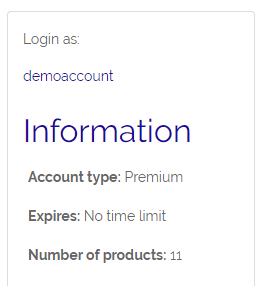
To access all your products (on the main account), they would first need to go to the main page and click on your username below Login as.If you instead invite your employees using the restricted account feature, they will see all the products and customers they have access to on their own account.